Streamlining Large File Imports in DataShed5

Discover how DataShed5 streamlines large data imports with background processing, chunked uploads, field mapping, and buffer table validation.
In today’s data driven world, organisations increasingly manage massive datasets that must be imported quickly, reliably, and at scale. Whether you’re loading geological assay results, survey data, or operational metrics, efficient large data importing is essential. This guide explores how DataShed5 streamlines large file imports with faster processing, background job handling, and smarter validation to ensure speed, reliability, and data integrity.
Why Large Data Imports Matter
Big data underpins modern decision making — but importing large datasets (often thousands or millions of rows) presents real challenges. Common issues include:
- System performance: Large files can freeze or slow applications.
- Data integrity: Import errors may lead to incomplete or corrupted records.
- User experience: Long waits, unclear progress, and stalled interfaces create frustration.
Systems like DataShed5 address these challenges with new capabilities that make large scale imports more efficient and far more reliable.
Key Innovations for Large File Imports
Recent updates to DataShed5 significantly enhance how large datasets are handled.
1. Improved Large Dataset Handling
Older systems often struggled with files above a few thousand rows. DataShed5 now supports files far beyond 3,500 rows without freezing or crashing, delivering the scalability modern operations require.
2. Optimised Backend Processing (Chunking)
Rather than loading an entire file into memory, DataShed5 processes imports in smaller data chunks. This reduces memory consumption and improves overall performance and stability.
3. Asynchronous Importing with Hangfire
Large imports run asynchronous background jobs using Hangfire.
This allows users to continue working while the import processes independently. Real time notifications provide status updates and completion alerts.
4. Sequential Job Execution for Data Integrity
Import jobs execute sequentially per user and per database, preventing conflicts — especially when importing parent child table relationships — and ensuring data integrity throughout the process.
How it Works
Here’s a step-by-step guide to importing large files using DataShed5.
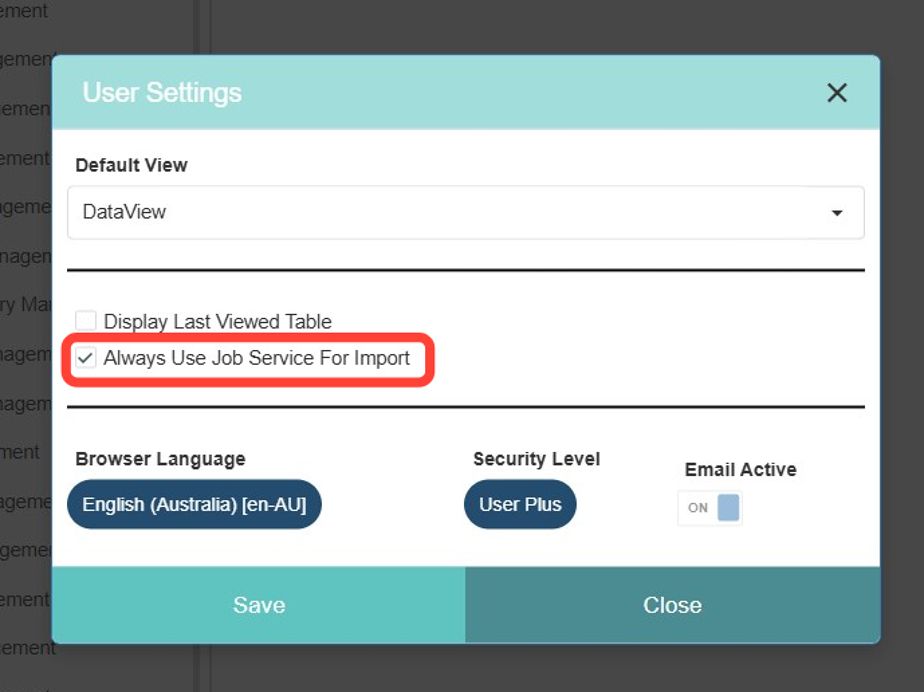
Step 1. Enable Job Service for Imports
In User Settings, select “Always Use Job Service For Import.” This ensures all imports run through Hangfire’s job service, providing fault tolerance and background processing. In any case, import jobs with 1,000 or more rows will always import using the Hangfire job service.
Step 2. Choose the Right Layout
Import layouts define how data maps to your database. Use the simplified Layout Type dropdown to select the appropriate category (CSV, Excel, Assay File, etc.), then choose or create a specific layout.
Step 3. Load Your File
After selecting the layout, click Load File. For CSV files, confirm the date format (usually DD/MM/YYYY). For Excel, use MM/DD/YYYY regardless of how dates appear in the file.
Step 4. Map Fields
The system automatically matches fields where names align. Unmatched fields appear highlighted, allowing you to map them manually. Not all fields need mapping—unmapped fields simply won’t import.
Step 5. Review in Buffer Table
Data first loads into an Import Buffer Table, where you can edit, delete, or validate records before committing them to the database. This step is crucial for catching errors early.
Step 6. Append or Merge Data
- Append Buffer to Database: Adds new records using SQL Bulk Insert.
- Merge Buffer to Database: Updates existing records using SQL Update.
Validation checks ensure only clean data moves forward. Errors remain in the buffer for correction.
Advanced Features for Power Users
- Find & Replace: Quickly update values across selected columns.
- Buffer Modifications: Apply SQL transforms before importing.
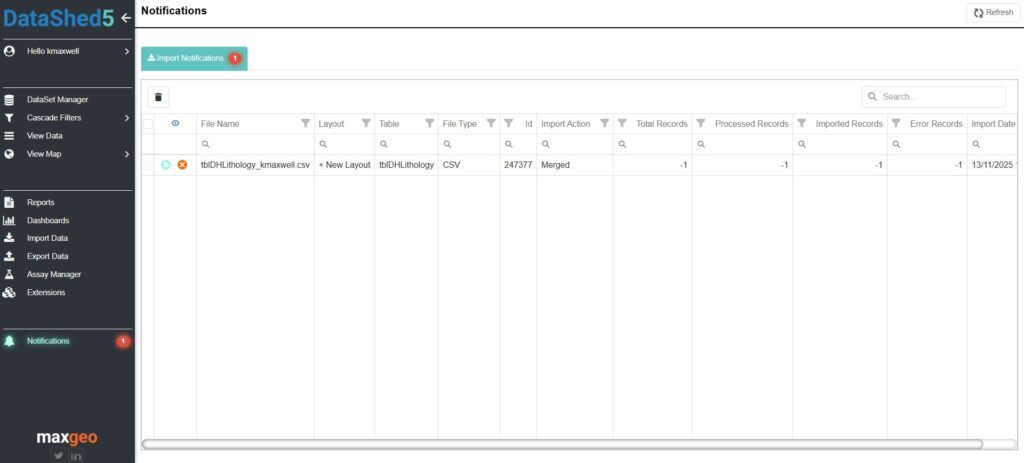
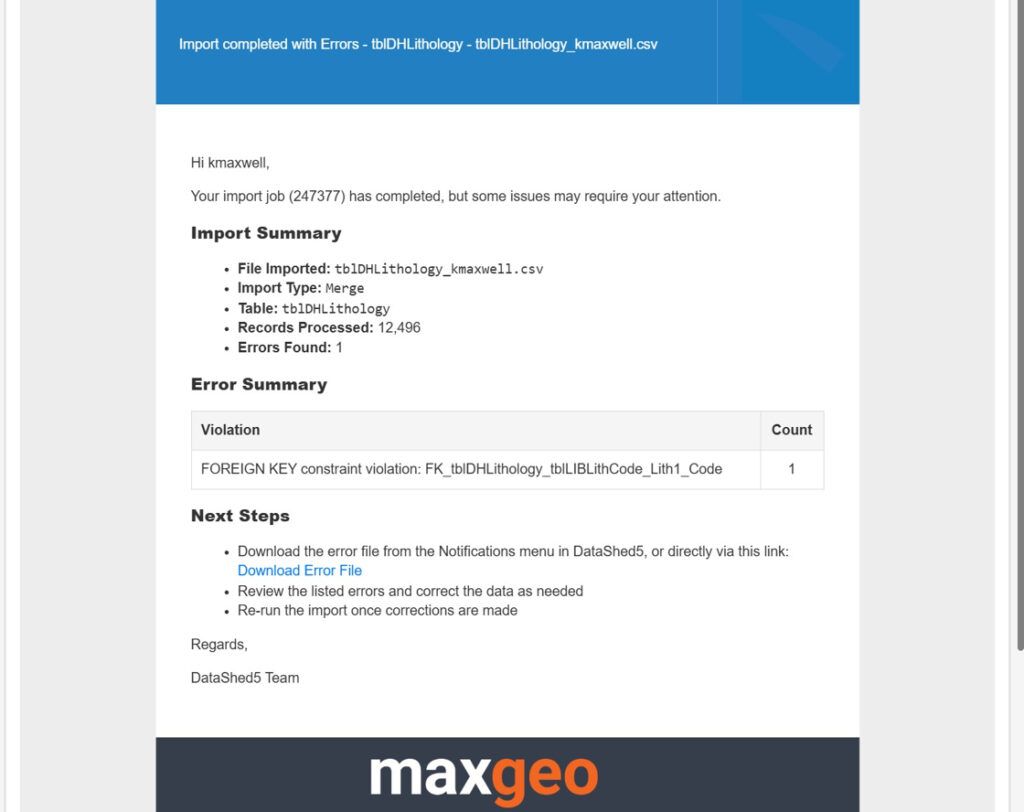
- Notifications: Receive real time progress alerts in app and via email.
Best Practices for Large Imports
To ensure smooth imports:
- Pre validate data: Clean source files to minimise import errors.
- Use systems with chunked uploads: Essential for large file stability.
- Monitor notifications: Avoids accidental duplicate imports.
- Save layouts: Reuse them for routine imports to save time and reduce mistakes.
The Future of Data Imports
As datasets continue to grow, import processes must evolve alongside them. Innovations like asynchronous processing, chunked uploads, and intelligent error handling are becoming standard practice, improving performance and elevating user experience.
Importing large data files doesn’t have to be complex. By using modern tools like DataShed5 and following proven best practices, organisations can ensure fast, accurate, and efficient data integration. Whether you’re importing thousands of assay results or millions of transactional rows, the right processes , and the right platform, make all the difference.